Main pages concerning Windows Mobile devices and the DontForget application are currently available only in Czech. English version is in preparation. Till then you always can find fresh information and news about DontForget development here.
• If you want to know more about the DontForget application click here..
• If you want to report a bug and discuss it please visit technical support page..
20. 1. 2011 – DontForget is now freeware!!!
Since 20th of January 2011 is DontForget for Windows Mobile distributed as freeware. Both editions i.e. for Smartphone (from version 2.70) and for PocketPC (from version 2.20) you can now have and use for free. You can purchase this freeware here.
1. 9. 2010 – Price reduction, save more than 40%
Since 1st of September 2010 the price was significantly reduced. Now you can have legal license of this software for your PDA just for 6,– Euro or 8,- USD. You can purchase the license from this page.
 26. 8. 2010 – DontForget 2.15 for PocketPC – just a small bugfix
Problem with the non-editable text field fixed. Now the field, where the user can enter the time when the device should be automatically re-booted, is marked in red colour, but still remains editable. This way user can correct wrong value entered.
PS: Trial period was reset in this release. Feel free to try it again…
You can download this version from the download page.
20. 2. 2009 – New technical Support and discussion Forum for the DontForget application available.
New discussion Forum for the DontForget application available.
Since now, you can find fresh information and news about DontForget development there.
You can subscribe to appropriate RSS channel within the Forum for up-to-date information on new versions, posts or answered question.
17. 12. 2008 – DontForget 2.12 for PocketPC – another small bugfix
Problem showing the QuickBar, i.e. small window with 2 icons which is shown when the user clicks on the status bar icon, fixed. In previous version the QuickBar was not shown correctly – as a normal full-screen window instead of a tool-window in the center of the screen.
You can download this version from the download page.
+ 12. 12. 2008 – DontForget 2.11 for PocketPC and 2.66 for Smartphone – small but highly recomended update
This time no new features. But this is highly recomended update for all users. Under some circumstances configuration changes made in the DontForget Admin were not reflected because currently running DontForget.exe instance was not terminated correctly in order to apply these changes. As a consequence, DontForget.exe wasn’t closed properly, DontForget might not behave correctly once started automatically on Admin „Apply and Exit“.
You can download this version from the download page.
28. 10. 2008 – DontForget 2.10 for PocketPC – new features and bugfixes
This update contains 3 new features and a couple of internal bugfixes. So what’s new:
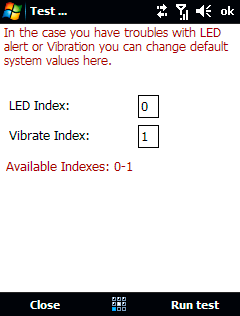
• For power users there is now the same possibility to set the LED/Vibration index as featured in SP version some times ago. It is important for user who have troubles with badly working vibrations or LED during reminder. Mainly on devices which have more than 2 system LED lights defined. E.g. on Samsung SCH-i760, with default settings the LED is blinking blue instead of orange and the whole system is very slow etc.
There are some OEM differences in the implementation and in some cases standard principles (DF is using) may not work correctly. So now you can set-up LED/Vibration parameters as needed. Just open the „Test“ dialog from the Admin and here you can see 2 boxes where you can change standard behaviour for you LED or Vibrations. E.g. for SCH-i760 try to enter 0 (zero) for vibrate index in order to make it working correctly. Then press „Run test“ to see whether it works or not. Because these settings are device dependent you have to experiment yourself with several numbers. Change the value and press „Run test“ each time you have changed the value to see what happened.
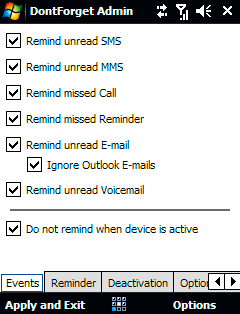
• New option „Do not remind when device is active“. This option is not enabled by default. When enabled, DF will not remind you about missed events by sound/vibration if the device is On or in the BacklightOff state (display is dimmed). This option can be useful in some cases you don’t want to be disturbed e.g. when you are playing some game, reading e-mail or running some navigation software in the foreground etc. Please also note, even this option is enabled you will still be notified by the LED. Also note, reminders are just postponed, not skipped.
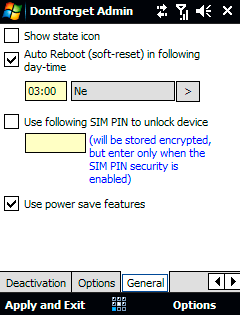
• New option „Use power save features“. This option is enabled by default. Usualy, when the DF is reminding you about missed event, and your device is currently (still) in the BacklightOff state (display is dimmed), this situation is evaluated as „the device is idle and not in use“ and DF forces the device to DisplayOff state (display is black, turned off) which later leads to Suspend state (power down). This scenario is OK in most situations and can save some battery power, but there also can be some cases when you cannot use this strategy. E.g. when some application is keeping the device in BacklightOff state (under TT7 the display is dimmed or so) DF will turn display off during reminder and the device will look like suspended. Use this option just in the case DF is turning your display off during reminder and it is not applicable.
As always, you can download this version from the download page.
25. 9. 2008 – DontForget 2.65 for Smartphone – LED/Vibrations again
This update for Smartphones contains (as usual) some internal fixes and modifications. No new real feature was added but this version is important for user who have troubles with non-working vibrations or LED during reminder. Mainly on devices which have more than 2 system LED lights defined. E.g. on Samsung Blackjack 2 (SGH-i617) you have no vibrations (even the option „Force vibrations“ is on) just a sound on reminders.
There can be (and really are) some OEM differences in the implementation and in some cases standard principles (DF is using) may not work correctly. So now you can set-up LED/Vibration parameters as needed. Just open the „Test“ dialog from the Admin and here you can see 2 boxes where you can change standard behaviour for you LED or vibrations. E.g. for Samsung Blackjack 2 you should enter 0 (zero) for vibrate index in order to make it working correctly.
You can download this update from the download page.
+22. 5. 2008 – DontForget 2.03 for PocketPC and 2.63 for Smartphone – LED and Vibration fixes
This update for Smartphones and PocketPCs contains some internal fixes only – no new feature was added. Mainly this version fixes the problem with LED and/or Vibration alert on devices which have more than 2 system LED lights defined (like HP iPAQ 614c) causing the device does not vibrate (or LED-blink) on remiders.
Please also note you can use DontForget application to simply fix the „Amber LED not blinking on Reminders“ problem.
You can download this update from the download page.
+29. 4. 2008 – DontForget 2.02 for PocketPC and 2.62 for Smartphone – internal changes only
There is no new feature in this update for Smartphones and PocketPCs. But this is recomended update for all users to avoid problems reported by some users who had troubles to run DontForgetAdmin e.g. after ROM update etc. Licence manager was internally modified and desktop PC installer was updated.
You can download this version from the download page.
11. 4. 2008 – DontForget 2.01 for PocketPC – maintenance update
This minor update contains just some small internal improvements. Mainly, ActivityLogging was extended to help find possible problems or bugs and to have a complete report from the user without further and detailed investigation. In the case you will have some troubles with the application or you will have a feeling there is a bug, simply go to the Admin’s menu and switch „Activity log“ on. This will create DontForgetLog.txt file in the same folder DontForget is installed (e.g. \Storage Card\Program Files\DontForget). Then close the Admin and simulate the behaviour again. Finally, send me the LOG file created via e-mail.
You can download this version from the download page.
8. 4. 2008 – DontForget for PocketPC devices released (and web pages updated)
Until now, DontForget was available for Smartphones only. But finally, DontForget designed for PocketPC devices was released and is available for download and purchase (read system requirements). But why we have two different versions or (better) editions? This is mainly because these two Windows Mobile sub-platforms (Smartphone/PocketPC) are very different and I would like to take advantage of the specific sub-platform. Although both versions of the DontForget have nearly the same possibilities and features you can find some small differences according to sub-platform. Even both editions offers nearly the same features, they are internally very different. PocketPC version is build on complettely new basis so it can take advantage of this sub-platform and it is optimized for 24/7 usage – especially for minimal CPU load and for tight cooperation with the Windows Mobile OS Power Management.
Please also note, web pages were updated. Read modified and improved description of the application.
As usual, you can download and purchase DontForget for PocketPC (labeled as version 2.00) from the download page.
17. 3. 2008 – DontForget 2.61 – just a minor update
This minor version update contains some internal modifications and improvements. I.e. Auto-reboot procedure was a bit modified to avoid sounds when the device is rebooting at night.
Also Trial period warning was improved and as a „bonus“ – this version resets the Trial period so you can evaluate it for the next 15 days.
You can download this version from the download page.
6. 3. 2008 – DontForget 2.60 – new feature and some fixes
New version of the DontForget for Smartphone introduces one new feature and fixes some known issues reported by users. What’s new:
• „Ignore Outlook E-mails“ option was added. When this option is switched on, DontForget will ignore all unread emails from the „Outlook E-mail“ account (e.g. after the sync) but still keep reminding of any unread e-mails in the other custom (POP) accounts you have.
• switching to the Flight-mode (phone off) procedure was modified for better compatibility
• automatic reboot procedure was also slightly modified
• a few internall changes made
You can download this version from the download page.
21. 2. 2008 – Get the DontForget 2.56
Recommended update. Problem with master volume level on some devices was fixed.
You can download this updated version from the download page.
20. 2. 2008 – New version available, DontForget updated to 2.55
This maintanance version fixes some issues and bugs reported by users. This new version also checks for available LEDs on the device which should avoid situations where some devices (like Samsung BlackJack’s nebo Motorola Q series), which doesn’t have main LED used for GSM state signalling, are continuously vibrating. What’s new in this release:
• Option „Enable LED alert“ and „Slow down LED blinking…“ cannot be now activated if the device doesn’t support it. I.e. if the device doesn’t have main LED used for GSM signalling. This should avoid continuous vibrations of these devices as reported by some users.
• Sound player module was rewritten. Known ugly knack/crack at the and of the reminder sound is gone. Also the problem playing some WAV file should be fixed now.
• Problem with sound volume fixed. Now the system volume level is not affected once the reminder sound is played.
• minor internal modifications
You can download this updated version from the download page.
18. 2. 2008 – DontForget for PocketPC in March
Just for those who are waiting for the DontForget for PocketPC (WM6 Professional). I’m currently working on version for PocketPCs. Even there are some difficulties (and differences comparing to Smartphones) it seems, the final release version will probably be available within the first half of March. Not currently sure whether some public Beta version will be published or not, but if someone (with WM experiences) wants join the Beta testing phase, let me know via e-mail.
4. 2. 2008 – DontForget was updated to version 2.51
This is just minor update. If the application is running fine on your device you needn’t install it. What’s new in this release:
• registration dialog fixed to avoid problems on devices with landscape oriented screens
• some other registration issues fixed
• minor bugs removed
You can download this updated version from the download page.
29. 1. 2008 – DontForget 2.50 was initialy released and web pages updated
Finally. After few months, DontForget in version 2.50 is released and available for download. Also web pages were modified, so you can find all the information about new features in one place. But the main change you probably already noticed. From now, DontForget is no longer distributed as a freeware. It doesn’t matter how you will call it, donationware or careware. I was searching for better sponsorship model to support sightless children in more useful way. This is the main reason why the application is no longer free. And of course, I would like to keep the future development. I would like to extend current functionality and also add some new features in the near future, still keeping the quality and technical support for you.
I hope you are so clever you will understand it. I hope you are able to spend just a few coins to purchase the license and benefit for sightless children.